It is wise to put thought and effort into customizing QR codes. Well designed QR codes attract attention, and get scanned more often.
Design
When using QR-codes, organizations often customize their QR-codes carefully, rather than sticking with the basic black-white blocks. QR-codes like these attract much more attention than standard ones. Here, we'll help you with some useful tips on designing you QR-codes for maximum efficacy.
In short
- Customizing QR-codes allows for unique designs, increasing attention and engagement.
- QR-codes can be turned into art pieces, offering an attractive and informative display.
- When customizing QR-codes, consider elements that do not impair ability to scan it, and avoid clutter.
QR-codes as art
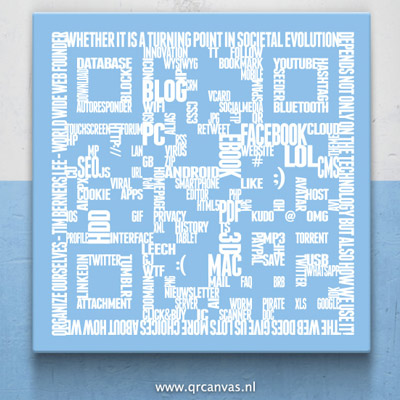
For state-of-the-art QR-codes we turn to QR Canvas, where colorful QR-codes are printed or hand-painted on a canvas. The painting can be crafted to your wish, and then it can be shown in e.g. a conference- or waiting room. An artpiece like this one is not only aesthetically pleasing, but it also attracts attention. A customer will be inclined to scan the QR-code, which is how QR-codes can be ideal in sharing information. QR-code artpiece, Source: QR CanvasYour own design
A QR-code artpiece works well, but it can be a little over the top for the goal you want to achieve: sharing information with as many customers as possible. It is wise to have a pretty, customized QR-code, but it doesn't have to be as perfect as the example above. When customizing, the best steps to start with are:- Giving people a reason to scan: This can be done through the option 'frame'. Because of this QR-codes are scanned more often.
- Adding an own logo or image. This makes the QR-code more unique, and it is more attractive.
- Using company colors; by using the option color you can select multiple colors yourself.
- Choosing a pattern that displays what you want to say. This can be done through 'design' , where different patterns can be chosen.
- Choosing a frame that fits your organization or message.
What should I pay attention to?
When using this list, it is important to notice what fits in the QR-code, and what doesn't. If a customizable element doesn't add anything, it is better not to include it, as it takes effort, and can make the QR-code seem messy. In any case, there are a few things that have to be avoided when customizing QR-codes:- Avoid confusion between images and logo's of your organization and other organizations;
- Stay clear of QR-codes that have become messy because of the design;
- Avoid using color or pattern combinations that don't match;
- Avoid QR-codes using color combinations with insufficient contrast, as these QR-codes can't be scanned anymore.