Voor drukwerk is het belangrijk om gebruik te maken van vectorbestanden. Dit zijn bestanden waar de kwaliteit goed blijft als hij wordt aangepast.
Connect to Wifi via your QR-code?
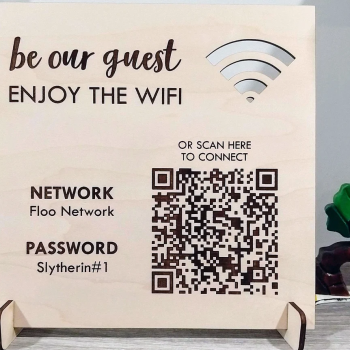
In the hospitality industry, putting up signs with the name and password of the Wifi network, or asking the Wifi details to staff is becoming redundant. Why? QR-codes! Connecting to Wifi through QR-codes is easy, quick and safe! Here we'll explain how to create these QR-codes and why you cannot fall behind.
In short
- Wifi QR-codes allow easy and secure connection to a Wifi network by scanning the QR-code.
- To generate a Wifi QR-code, provide the network name, security type, and password, then download the QR-code.
- It is safe, easy and quick!
How does a Wifi QR-code work?
A Wifi QR-code contains all information you normally need to connect to the Wifi network.The information can be interpreted by a phone when you scan the QR-code. A pop-up will appear, allowing someone to connect to the Wifi network immediately. Therefore, you just have to point your camera towards the QR-code, click on the pop-up, and we're done! Pop-up after scanning a Wifi QR-code.
How do I generate this QR-code?
At this moment, it is only possible to generate a static Wifi QR-code. To do this, you'll just have to follow these steps:- Go to the static QR-code generator at QRcode.me.
- Select the option 'Wifi'.
- Enter the network name, the security type, and the password of the Wifi network. This can all be found on the router.
- You can customize the QR-code if you want to.
- Click on the 'save' button to download the QR-code!
What are the advantages?
For the ones generating and for the ones using the QR-code, there are a few noteable advantages to be mentioned:- It's safe;
- The amount of users of the Wifi network can be measured easily;
- It is very quick;
- It is easier than typing in everything yourself;
- Next to Wifi, you're also able to direct customers to other information through the QR-codes.